
Mastering Kubernetes from Scratch Part 14 - Understanding Container Probes
Introduction to Container Probes


What are Container Probes?
In Kubernetes, container probes are essential for monitoring the health and readiness of application containers. They enable Kubernetes to determine when to restart a container, remove it from service, or mark it as ready to handle requests.
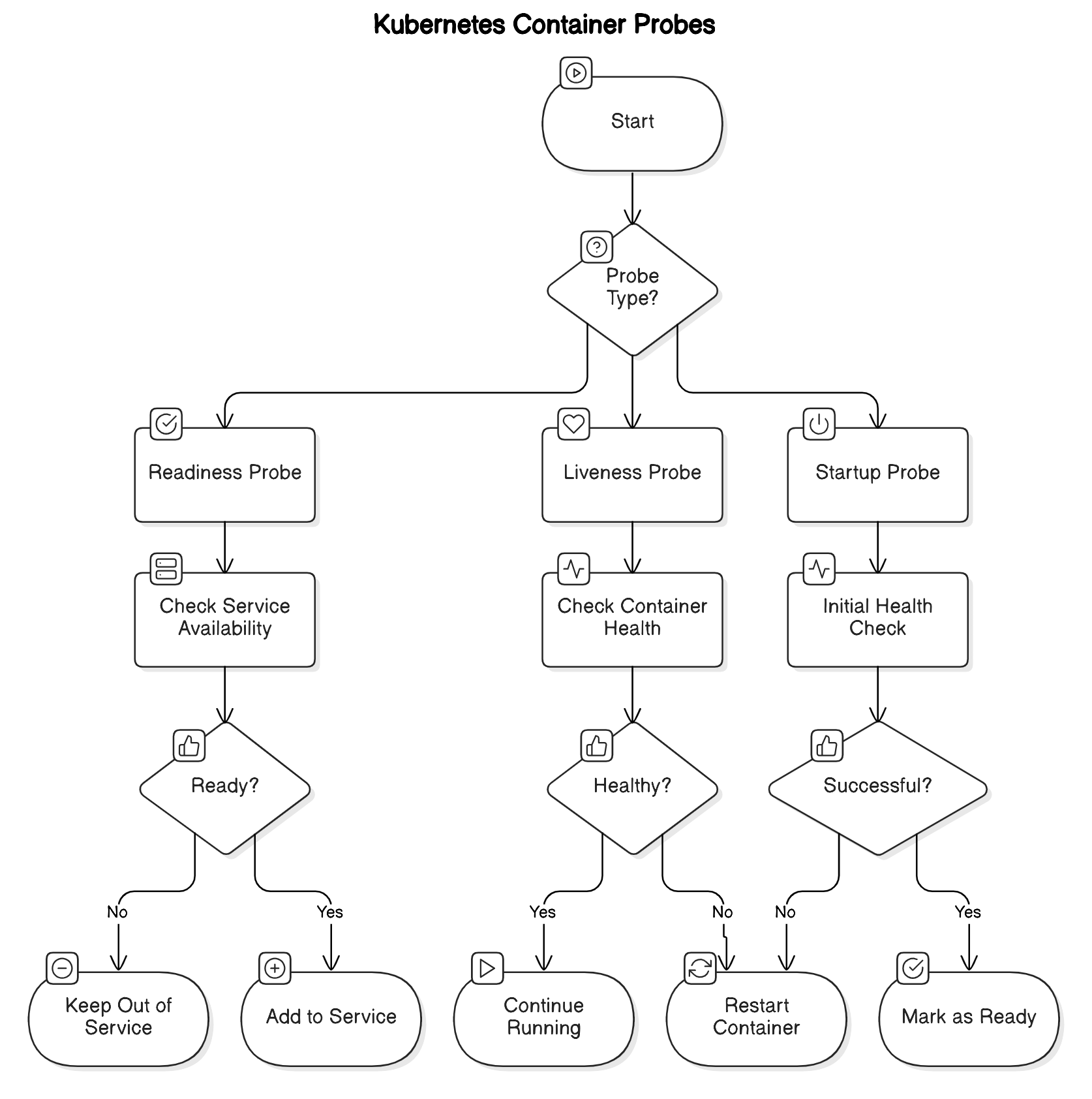
Probe Types
The following types of probes exist:
Liveness Probe: Checks whether the container is still running properly. If it fails, Kubernetes restarts the container.
Readiness Probe: Verifies if the container is prepared to serve traffic. A failed readiness probe leads Kubernetes to exclude the container from the list of available endpoints, stopping traffic routing to it.
Startup Probe: Checks if the container has started successfully. This is particularly useful for applications with extended startup times. Kubernetes waits for the startup probe to succeed before initiating liveness or readiness probes.
Probe Mechanisms
Probes can perform checks using the following methods:
HTTP GET Probe: Sends an HTTP GET request to a specified endpoint. A response code between 200 and 399 indicates a successful probe.
TCP Socket Probe: Attempts to establish a TCP connection to a container's specified port.
Exec Command Probe: Executes a command inside the container. If the command exits with a status code 0, the probe is successful.
Best Practices for Configuring Probes
Here are some rules of thumb to help you make the most out of container probes:
Simplicity and Lightweight Design: Keep probe checks simple and lightweight to avoid introducing latency and impacting container performance.
Appropriate Delays: Set realistic
initialDelaySecondsto provide sufficient time for your application to start before probes begin. This is crucial for applications with longer initialization periods. When you expect very long-running tasks, consider using init-containers to perform the tasks. After the init-container finishes its work, the main container starts. This will prevent timeouts in startup probes.Timeouts and Periodicity: Configure
timeoutSecondsandperiodSecondsthoughtfully. Ensure thattimeoutSecondsis set appropriately to avoid premature timeouts, andperiodSecondsis aligned with your application's health check requirements.Avoiding Overly Complex Checks: Overly complex probe checks can introduce latency and inadvertently impact container performance.
Container Probe Example Use Case
In a real-world application, you often need to ensure your service is healthy and ready to serve traffic. Let's take a simple Spring Boot application as an example. We’ll expose two endpoints: /health for liveness checks and /ready for readiness checks. Kubernetes probes will use these endpoints to monitor the application’s state, restarting it if it becomes unresponsive or temporarily removing it from service if it's not ready.
Spring Boot Example for Kubernetes Probes
In a typical Spring Boot application, you can create health and readiness endpoints using @RestController:
import org.springframework.web.bind.annotation.GetMapping;
import org.springframework.web.bind.annotation.RestController;

@RestController
public class HealthCheckController {

    @GetMapping("/health")
    public String healthCheck() {
        return "Application is healthy";
    }

    @GetMapping("/ready")
    public String readinessCheck() {
        return "Application is ready";
    }
}
With these endpoints exposed, you can configure Kubernetes probes. Save the following YAML as springboot-probes.yaml:
apiVersion: v1
kind: Pod
metadata:
  name: springboot-probes
spec:
  containers:
  - name: springboot-app
    image: my-springboot-app:latest
    ports:
    - containerPort: 8080
    livenessProbe:
      httpGet:
        path: /health
        port: 8080
      initialDelaySeconds: 10
      periodSeconds: 5
    readinessProbe:
      httpGet:
        path: /ready
        port: 8080
      initialDelaySeconds: 5
      periodSeconds: 5
In this configuration:
/health → Used by the liveness probe to check if the app is running.
/ready → Used by the readiness probe to verify if the app can handle traffic (e.g., database connection is ready).
Note: Make sure your container image is pushed to a container registry like Docker Hub or a private registry accessible by your Kubernetes cluster.
Before deploying to Kubernetes, you can test your health and readiness endpoints locally with simple curl commands:
$ curl http://localhost:8080/health
$ curl http://localhost:8080/ready
This verifies that your application exposes the correct endpoints.
Deploy the Pod:
$ kubectl apply -f springboot-probes.yaml
Check the pod and probe status:
$ kubectl get pods
$ kubectl describe pod springboot-probes
Run the following command to forward port 8080 from the pod to your local machine:
kubectl port-forward pod/springboot-probes 8080:8080
Now, you can use curl to test the probes.
Conclusion
Container probes help Kubernetes maintain application reliability by detecting failures, ensuring readiness, and restarting unhealthy containers. Properly configured probes prevent downtime and improve traffic management in production environments.